




Share Item
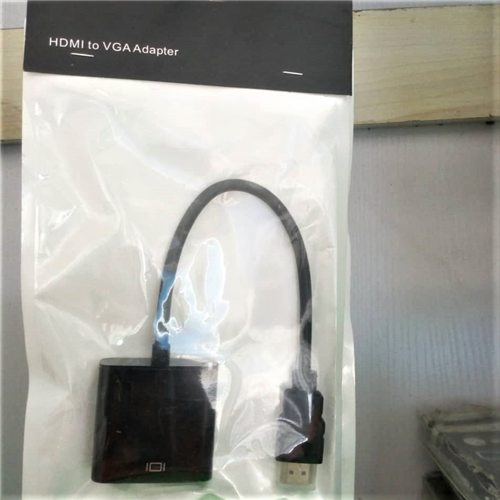
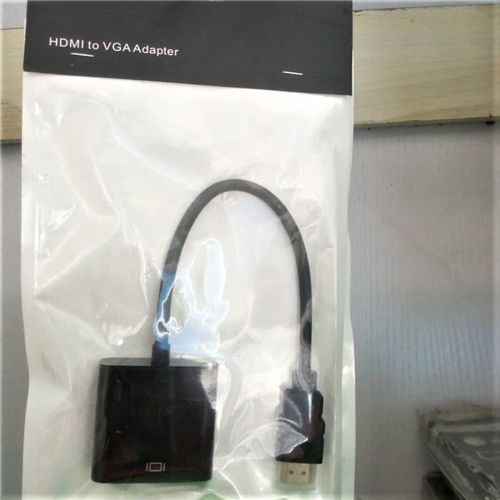
HDMI TO VGA ADAPTER
10V; 240Hz
| Colour | Black |
- The HDMI to VGA adapter connects an HDMI compatible device to a monitor or projector with VGA port; A VGA cable (sold separately) is required
- Built-in active IC chip improves compatibility. Included Micro-USB cable provides additional power for devices with low-power output port such as MacBook Pro with Retina Display
- The HDMI to VGA converter supports resolutions up to 1920x1080 (1080p Full HD) including 720p and 1600x1200 for HD monitors or projectors. Audio port can connect to speaker, headphone, amplifier and other devices
- The HDMI VGA converter is compatible with desktop, laptop, Ultrabook, notebook, Intel Nuc, Macbook Pro, Raspberry Pi, Chromebook, Apple TV, Roku streaming media player or other devices with HDMI port. Does not support HDCP copyrighted content such as Blue-ray discs, PS3, PS4
- Gold-plated connectors resist corrosion, provide rigidity, and improve the signal performance. Package includes: a HDMI to VGA adapter, a Micro-USB cable, a Audio cable. Customer service from Rankie
-
- VGA to HDMI, Onten Metal VGA to HDMI Adapter with Audio Cable and Micro USB Cable for the Low Voltage Devices, the Old laptop and game device to HDMI TV or Projector.
-
- Introduction: This VGA to HDMI Adapter allows you to convert analog VGA output from most PCs and laptops to your HDTV. Our adapter features a built in audio cable and USB cable, so you only need one connection to connect both video and audio signals from your computer to your TV. Share your video/audio/data from computers oroldstyled notebooks, desktops, laptops that has only VGA ports to any HDMI equiped devices like HDTVs, monitors, displayers for big screen viewing.
-
- Features: Input:VGA (DB15 Male)and Audio(3.5 Audio Jack) Output:HDMI(Type A 19pin Female) Convert VGA +Audio to HDMI output. Support resolution up 720P/ 1080i 1080P output. Support VGA a lot of resolution from 800*600 to 1920*1080 input. Cable length: 20cm
-
- How to use:
-
- 1. Insert the VGA interface into the computer or other equipment with the VGA output.
-
- 2. Plug the USB and audio connector into the related interfaces.
-
- 3. Insert the other connector into the HDMI cable, and then connect the HDMI cable to the displayer and the projector device with the HDMI interface.
-
- 4. Play the video, PPT and documentation, the image will display on the screen of the other display device
.jpg)
.jpg)
-MANUAL(1).jpg)
.jpeg)
.jpg)
.jpg)
.jpg)
.jpg)
.Jpeg)
.jpg)
.jpg)
.jpeg)


